GAMING VPN FOR IPHONE
Gaming VPN.Made foryour iPhone.
Pick your game. Connect with automatic VPN route selection. Keep your ping in view, from the first connection to the next match.
See how it worksFor iPhone · Currently in beta
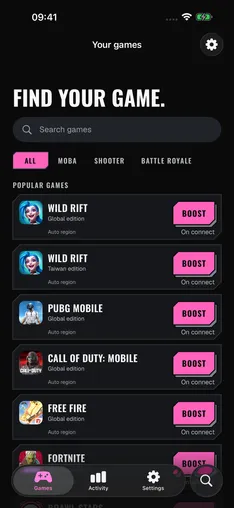
FIND YOUR GAME
- Wild Rift
- PUBG Mobile
- Call of Duty: Mobile
- Free Fire
PICK. CONNECT. PLAY.
A little less setup. A little more game.
Start with your game.
Browse the catalog, find your favorite, and save your selection for the next match.
Let the route choose itself.
Headshot measures available VPN gateways and automatically selects a route before connecting.
Keep an eye on your ping.
Check latency on the live dashboard. Direct measurements and estimated route timings are clearly labeled.
BEFORE YOU CONNECT
A clearer picture of your connection.
What a gaming VPN does, and what to expect from Headshot.
Can Headshot lower my ping?
High ping can come from Wi-Fi or mobile data, your provider’s routing, or the distance to a game server. A VPN route may help on some connections, but it can also add latency. Headshot shows connection measurements so you can compare; lower ping isn’t guaranteed.
Does the VPN only route my selected game?
No. While connected, Headshot routes traffic from other apps too. Choosing a game labels your session; it does not limit the VPN to that game.
What do I need to use Headshot?
Headshot is currently in beta for iPhone. The app interface is available in English and Portuguese. VPN access requires an auto-renewing subscription.